Case 1: Adding a Column to an Incremental Pipeline
This guide shows how to add a new column to an existing incremental pipeline and backfill historical data.
Prerequisite: see the 00-setup-e-helpers.ipynb notebook to understand how to obtain the job_id.
Authentication
import requests
import os
import json
from pprint import pprint

BASE_URL = "https://maestro.dadosfera.ai"

response = requests.post(
    f"{BASE_URL}/auth/sign-in",
    data=json.dumps({
        "username": os.environ['DADOSFERA_USERNAME'],
        "password": os.environ["DADOSFERA_PASSWORD"]
    }),
    headers={"Content-Type": "application/json"},
)

headers = {
    "Authorization": response.json()['tokens']['accessToken'],
    "Content-Type": "application/json"
}
Step 1: Create the test pipeline
For this example, we create a pipeline that synchronizes the MySQL table pedidos.
import uuid
uuid.uuid4()
payload = {
    "id": "7b8b3399-b8c0-4fc5-9116-142cd9f4e7ae",
    "name": "Orders",
    "cron": "@once",
    "description": "tabela pedidos",
    "jobs": [
        {
            "input": {
                "connector": "jdbc",
                "plugin": "mysql",
                "table_schema": "cadastros",
                "table_name": "pedidos",
                "load_type": "incremental",
                "incremental_column_name": "updated_at",
                "incremental_column_type": "timestamp",
                "column_include_list": ["id","cliente_id","valor","status","created_at","updated_at"],
                "auth_parameters": {
                    "auth_type": "connection_manager",
                    "config_id": "1763991009206_kvpd3364_mysql-1.0.0"
                }
            },
            "transformations": [],
            "output": {
                "plugin": "dadosfera_snowflake"
            }
        }
    ]
}

response = requests.post(f"{BASE_URL}/platform/pipeline", headers=headers, data=json.dumps(payload))
response = requests.get(f"{BASE_URL}/platform/pipeline/7b8b3399-b8c0-4fc5-9116-142cd9f4e7ae/pipeline_run", headers=headers)
response.json()
[{
  "last_status": "SUCCESS",
  "pipeline_run_id": "cbab0131966a40809491555a8f23e272",
  "updated_at": "2025-12-17T20:41:25.401858+00:00",
  "pipeline_id": "7b8b3399_b8c0_4fc5_9116_142cd9f4e7ae",
  "id": 2246,
  "created_at": "2025-12-17T20:37:54.422460+00:00"
}]
Step 2: Inspect the JDBC job
JOB_ID = "7b8b3399-b8c0-4fc5-9116-142cd9f4e7ae-0"
response = requests.get(f"{BASE_URL}/platform/jobs/jdbc/{JOB_ID}", headers=headers)
job_config = response.json()
pprint(job_config)

print("\nCurrent columns:")
print(job_config.get("source_config", {}).get("column_include_list", []))
{
  "cron": "@once",
  "customer_id": "dadosfera",
  "description": "tabela pedidos",
  "id": "7b8b3399_b8c0_4fc5_9116_142cd9f4e7ae",
  "job_name": "cadastros_pedidos",
  "name": "Orders",
  "output_config": {
    "plugin": "dadosfera_snowflake",
    "table_name": "tb__xqfu8g__cadastros__pedidos"
  },
  "source_config": {
    "column_include_list": ["id", "cliente_id", "valor", "status", "created_at", "updated_at"],
    "connector": "jdbc",
    "incremental_column_name": "updated_at",
    "incremental_column_type": "timestamp",
    "load_type": "incremental",
    "plugin": "mysql",
    "table_name": "pedidos",
    "table_schema": "cadastros"
  }
}
Current columns:
['id', 'cliente_id', 'valor', 'status', 'created_at', 'updated_at']
Result of the first execution
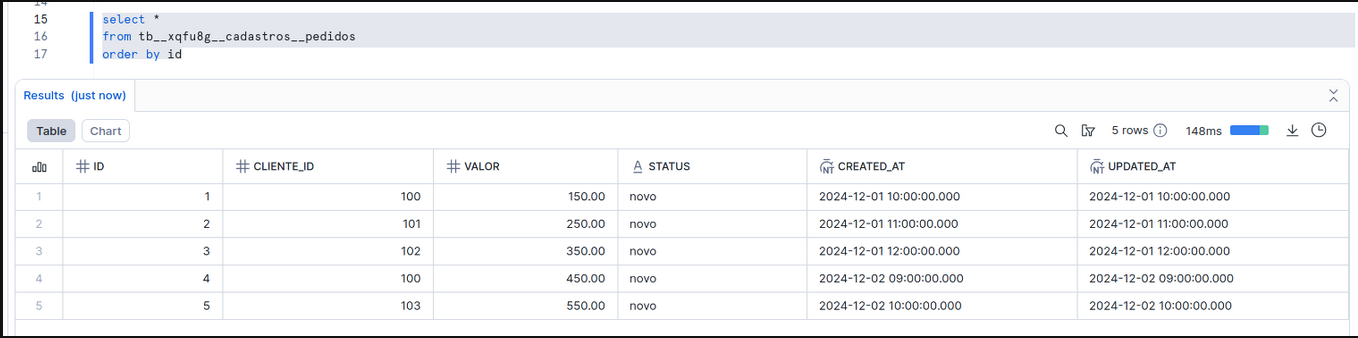
The pipeline synchronized the first 5 records from the pedidos table.
Step 3: Add a new column in the source
The development team added a new telefone column to the source table:
ALTER TABLE cadastros.pedidos ADD COLUMN telefone VARCHAR(20) DEFAULT NULL;

UPDATE cadastros.pedidos SET telefone = '11999990001', updated_at = '2025-12-17 16:50:00' WHERE id = 1;
UPDATE cadastros.pedidos SET telefone = '11999990002', updated_at = '2025-12-17 16:50:00' WHERE id = 2;
UPDATE cadastros.pedidos SET telefone = '11999990003', updated_at = '2025-12-17 16:50:00' WHERE id = 3;
UPDATE cadastros.pedidos SET telefone = '11999990004', updated_at = '2025-12-17 16:50:00' WHERE id = 4;
UPDATE cadastros.pedidos SET telefone = '11999990005', updated_at = '2025-12-17 16:50:00' WHERE id = 5;
The pipeline ran again, but the new column had not been configured yet. The data was replicated, but the telefone column did not appear. To fix this, we need to:
- Add the column to the pipeline configuration.
- Reset the state so the data is extracted again with the new column.
Step 4: Add the new column to the pipeline
The PATCH /platform/jobs/{jobId}/input endpoint merges columns, so the new column is appended to the existing list.
NEW_COLUMN = "telefone"

payload = {
    "column_include_list": [NEW_COLUMN]
}

response = requests.patch(
    f"{BASE_URL}/platform/jobs/{JOB_ID}/input",
    headers=headers,
    json=payload
)
pprint(response.json())
{
  "detail": "Successfully updated input fields for job_id 7b8b3399_b8c0_4fc5_9116_142cd9f4e7ae_0",
  "status": true,
  "updated_fields": ["column_include_list", "info"]
}
response = requests.get(f"{BASE_URL}/platform/jobs/jdbc/{JOB_ID}", headers=headers)
job_config = response.json()
print("Columns after the update:")
print(job_config.get("source_config", {}).get("column_include_list", []))
Columns after the update:
['id', 'cliente_id', 'valor', 'status', 'created_at', 'updated_at', 'telefone']
Step 5: Reset the state partially (backfill)
response = requests.post(
    f"{BASE_URL}/platform/jobs/{JOB_ID}/reset-state",
    data=json.dumps({"incremental_column_value": "2025-12-17 17:49:00"}),
    headers=headers
)
pprint(response.json())
{
  "detail": "Successfully reset state for job_id 7b8b3399_b8c0_4fc5_9116_142cd9f4e7ae_0",
  "incremental_column_value": "2025-12-17 17:49:00",
  "state": {},
  "status": true
}
Step 6: Remove duplicate records from the target
Before running the pipeline again, remove the records that will be extracted again in Snowflake to avoid duplicates:
DELETE FROM public.tb__xqfu8g__cadastros__pedidos
WHERE updated_at >= '2025-12-17 17:50:00.000';
Step 7: Run the pipeline again
Result
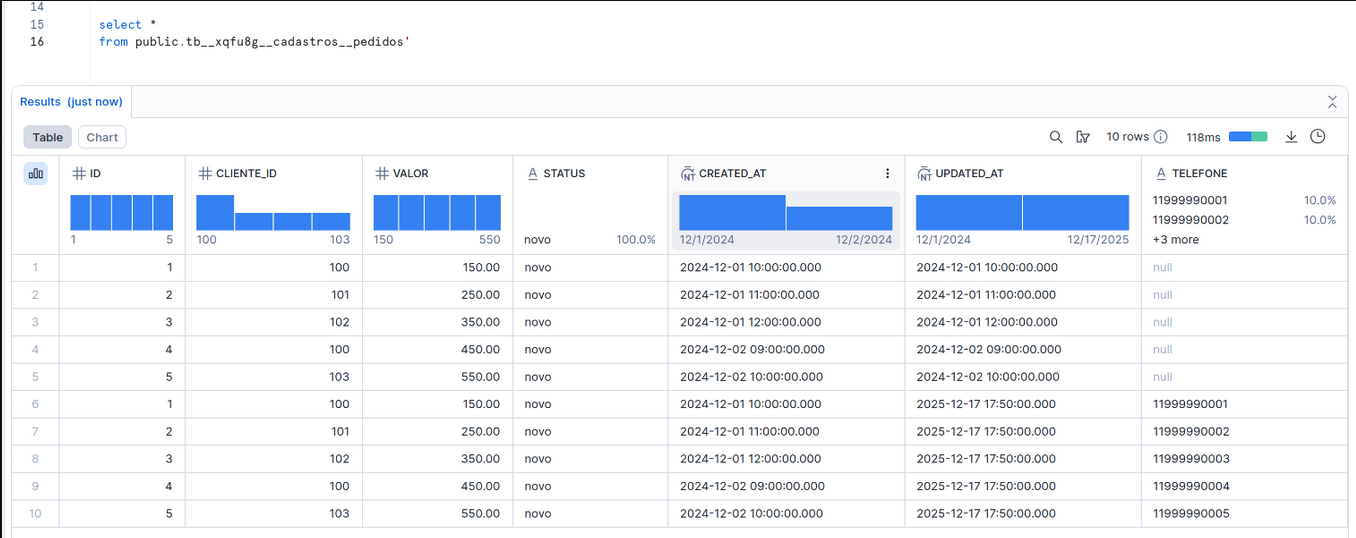
The telefone column is now present in the dataset.
Notice that duplicate records still exist for the same id with different versions. To resolve that, see Case 2: Migrating to Incremental with Qualify.