Git Integration in the Transformation and Intelligence Modules
🧑💻 Git is a distributed version control system 📂🔄 that helps you track, manage, and version source code efficiently. It was created by Linus Torvalds, the creator of Linux 🐧, and is widely used across the software industry.
🔵 GitHub, GitLab, Bitbucket, Azure DevOps, and even Gitea are platforms that use Git to host repositories, collaborate with teams, and integrate CI/CD pipelines. They act as cloud environments where projects can be stored and managed.
Git integration in the Transformation and Intelligence modules is a critical step before updating code and performing deployments. Without it, you cannot version, track, or properly deploy changes to development and production environments.
Integrating projects with GitHub is a software engineering best practice because it provides:
✅ Better traceability for code changes.
✅ Efficient version control.
✅ Easier collaboration between developers.
✅ Safer code storage.
Git integration steps
In the example below, we use the following flow.
Create Git SSH keys (public and private) on your local machine
To guarantee a secure connection between your local machine and the Git repository, generate an SSH key pair.
📌 Run the following command in your terminal:
ssh-keygen -t rsa -b 4096 -C "seu.email@empresa.com" -f ~/.ssh/id_rsa_projeto
Replace seu.email@empresa.com with your corporate email address and id_rsa_projeto with a meaningful name for the generated key pair.
Copy and register the public SSH key in GitHub
After generating the keys, copy the public key and register it in GitHub:
cd .ssh/
cat id_rsa_projeto.pub # Copy the command output
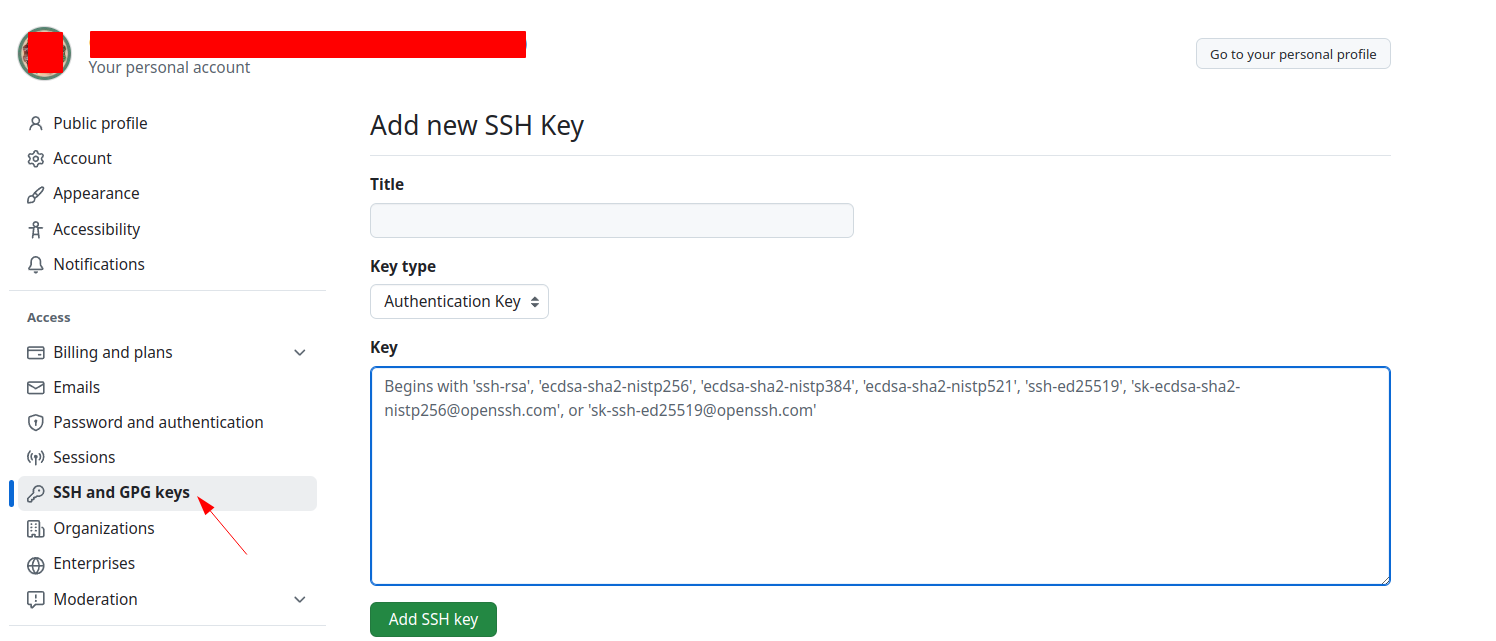
Then go to GitHub and follow these steps:
- Click your profile picture in the upper-right corner.
- Go to
Settings->SSH & GPG Keys. - Click
New SSH Key. - Paste the copied public key into the proper field.
- Save the key.
Register the private SSH key in the Transformation or Intelligence module
Each module inside the Dadosfera platform (Transformation and Intelligence) has a gear icon ⚙ in the upper-right corner of the page.
📌 To configure the private SSH key in the Transformation or Intelligence module:
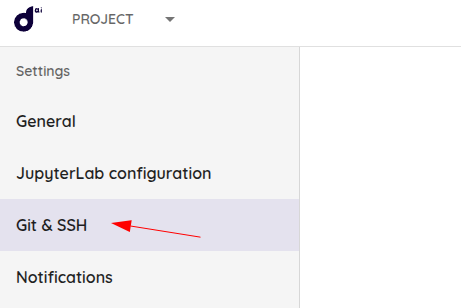
- Click the ⚙
Project Settingsicon.

- Open the
Git & SSHtab.
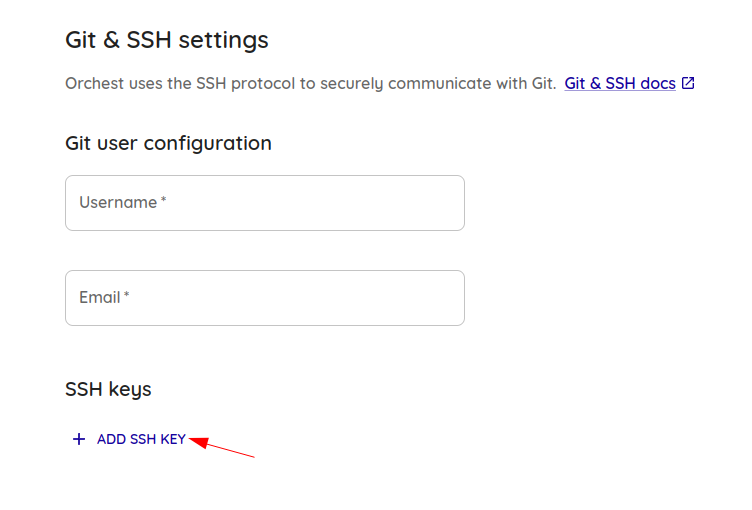
- Click
ADD SSH KEY.
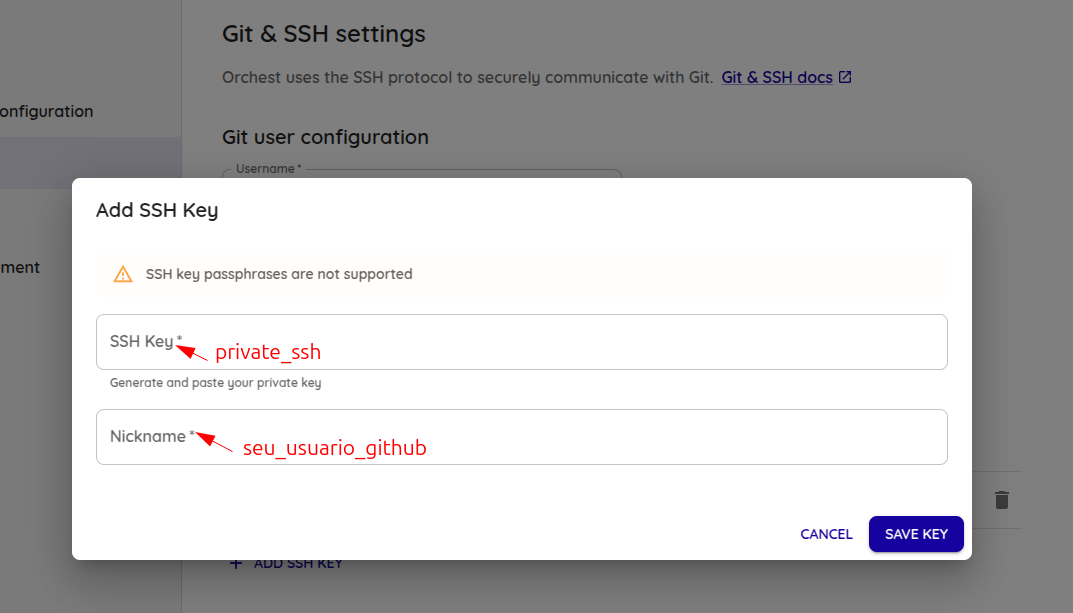
- Enter the private SSH key and your GitHub username in the proper fields.
In this example, private_ssh is id_rsa_projeto.
IMPORTANT!
After configuring Git SSH, you must restart the project pipeline_session so the Intelligence and Processing modules can load the new credential.
Considerations for the Transformation and Intelligence modules
The Transformation and Intelligence modules do not have user-level credential isolation inside the project. This means the configured Git credential becomes accessible to everyone who has access to the project.
🔹 To make sure a specific user retains control over the configured credential, turn off the project pipeline_session after finishing your work. This should be done only if there are no Data Apps that need to stay running.
🔹 In practice, the Transformation and Intelligence modules always use the credentials of the last user who restarted the pipeline_session.
Download the project inside the Transformation or Intelligence module using Git
After configuring the credentials, you can download the repository directly inside the Transformation or Intelligence module.
Clone the Git repository inside the Transformation or Intelligence module
- Open the target module (Transformation or Intelligence).
- Open the terminal through Jupyter (option 4).
- Remove the default Git tree created in the project root:
rm -rf .git
- Clone the desired Git repository and enter it:
git clone git@github.com:<usuario>/<nome-do-repositorio>.git
cd <nome-do-repositorio>
Replace:
<usuario>with the GitHub user or organization name.<nome-do-repositorio>with the repository name you want to clone.
If the repository already exists, update it to make sure you have the latest version of the code:
git pull origin main
- Switch to the target branch before renaming files.
git checkout -b minha-nova-feature
Adjust files to avoid conflicts
- Rename the default files created by the Transformation or Intelligence module to avoid conflicts:
mv main.orchest main.orchest.bk.git
mv readme.md readme_bk.md
- Move all files from the cloned repository to the parent directory, including hidden files:
mv ./ ../ && mv .[^.] ../
Process summary
1️⃣ Create the public/private Git key pair on your local machine.
2️⃣ Configure Git and SSH on GitHub and in the Intelligence module.
3️⃣ Clone the project inside the Intelligence module.
Code update and deployment
After configuring Git and cloning the repository, you can move on to the next step:
✅ Modify the code locally and test it.
✅ Push the changes to the main branch.
✅ Run the deployment workflow.
🔹 For more details, see the internal code update and deployment guide for the Processing and Intelligence modules with GitHub Actions.
For more details about Git integration in the Transformation and Intelligence modules, contact Support or the Professional Services team assigned to your project.