Introduction | Process
What is the Processing Module?
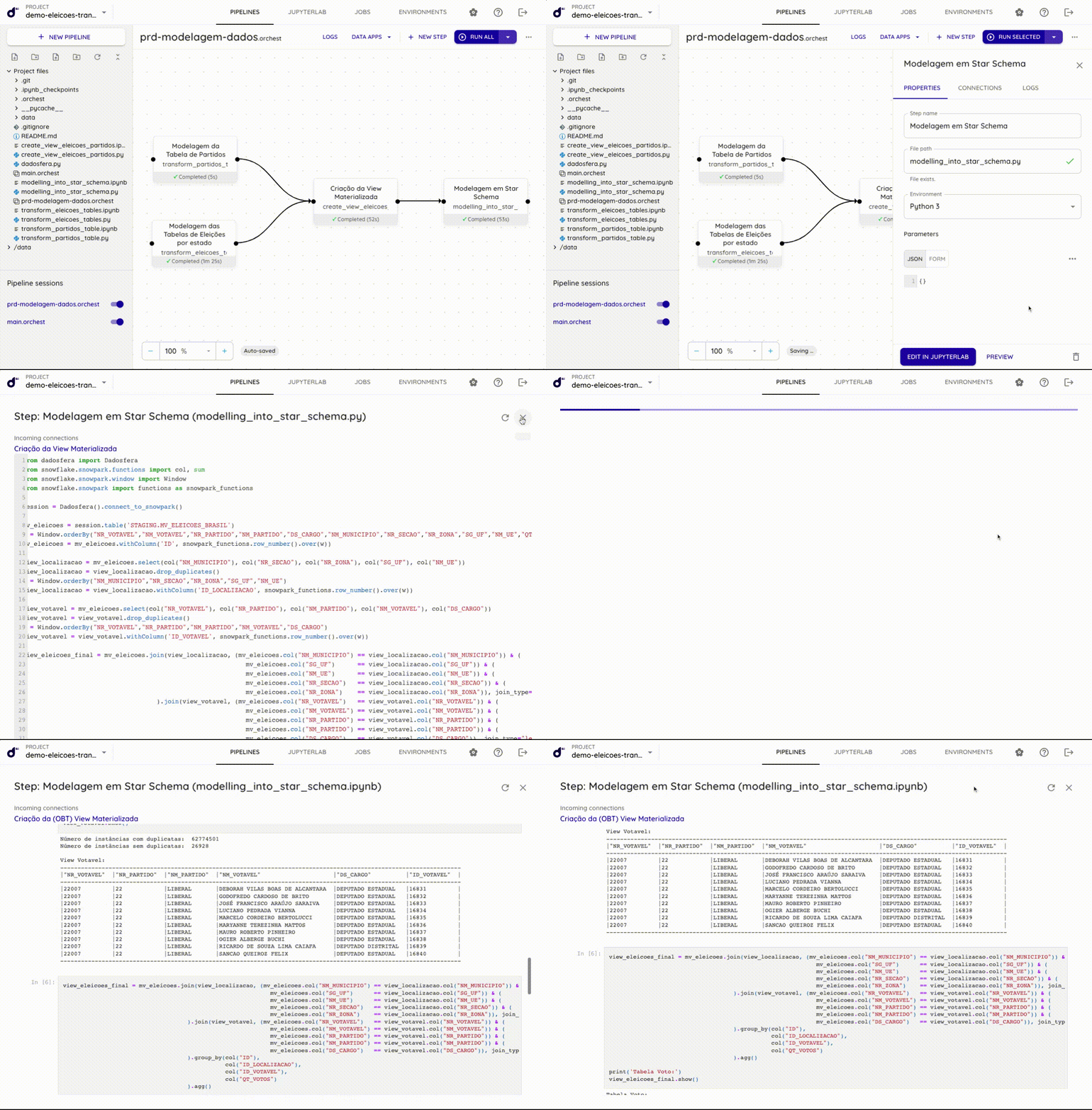
Create data transformation workflows in Python, R or Julia within Dadosfera. Use the power of Snowflake and Python with the same calls used by PySpark and Pandas.
Limitations
📘
Check whether your company's plan includes access to the Processing Module.
This module is partly separate from Dadosfera's other native modules because it has dedicated infrastructure to operate as efficiently as possible.
This module is currently offered in English only.
Concepts
At a high level, all module pages are simply "views" of files in the file system. In detail:
Projects
Apart from global settings and authentication, everything in the module is encapsulated in Projects. Think of a project as a folder in your file system containing files.
Files
You can add as many files to a project as needed for the system to work well and perform efficiently. The environment supports files in several languages, such as Python, R and Julia, as well as notebooks. These files can be interconnected to create integrated, continuous workflows across languages and formats.
Pipelines
Pipelines are another important Dadosfera concept. A pipeline connects multiple steps that determine execution order and continue working on the resulting data. The complete pipeline description is stored in a single JSON file, so pipelines can be fully versioned and you can track any changes made to them.
Environments
Because the module is fully containerized, all code must run inside a container. Since code may require additional dependencies (such as libraries), the container, or more precisely its underlying image, must be configured for your needs. You can fully customize container images using a setup script that we create automatically for you. This is what we call an Environment.
Jobs
After creating a pipeline, writing the files, configuring the steps and setting up environments, you need to run it. You can run it in the pipeline editor for easy testing during development, or use Jobs to execute a production pipeline on a recurring schedule (for example, daily). See the complete scheduling tutorial here.
Keyboard shortcuts
| Key | Action |
|---|---|
| Space + click + drag | Pan canvas * |
| Scroll up/down | Pan the canvas up/down * |
| Scroll left/right | Pan the canvas left/right * |
| Shift + scroll up/down | Pan the canvas left/right * |
| Shift + scroll left/right | Pan the canvas up/down * |
| Ctrl (or ⌘) + scroll up/down | Zoom in/out * |
| Ctrl + click | Select multiple steps |
| Ctrl + A | Select all steps * |
| Ctrl + Enter | Run selected steps * |
| H | Center view and reset zoom |
| Escape | Deselect steps |
| Delete/Backspace | Delete selected step(s) |
| Double click a step | Open file in JupyterLab |
General settings
The module is configured through Settings. Some settings require a module restart before changes take effect. For example:
{
  "AUTH_ENABLED": false,
  "MAX_BUILDS_PARALLELISM": 1,
  "MAX_INTERACTIVE_RUNS_PARALLELISM": 4,
  "MAX_JOB_RUNS_PARALLELISM": 4,
  "TELEMETRY_DISABLED": false,
  "TELEMETRY_UUID": "69b40767-e315-4953-8a2b-355833e344b8"
}
- AUTH_ENABLED: Enables authentication. When enabled, Dadosfera requires a login. Create user accounts through Settings > User management. Dadosfera does not yet support individual user sessions, meaning there is no granularity or security between users. (Boolean: true or false)
❗️
Authentication is enabled by default. We do not recommend disabling it and exposing the module to any user without a login.
- MAX_BUILDS_PARALLELISM: Controls the total number of environment and JupyterLab image builds that can run in parallel. (Integer in: [1, 25])
- MAX_INTERACTIVE_RUNS_PARALLELISM: Controls how many interactive pipeline runs can run in parallel for different pipelines at a given time. For example, setting this to 2 allows only 2 different pipelines to have interactive runs simultaneously. This is useful when multiple users use Dadosfera. (Integer in: [1, 25])
- MAX_JOB_RUNS_PARALLELISM: Controls how many job runs can run in parallel across all jobs. For example, setting this to 3 allows only 3 pipeline runs in parallel. (Integer in: [1, 25])
- TELEMETRY_DISABLED: Disables telemetry. (Boolean: true or false)
- TELEMETRY_UUID: UUID for tracking usage across user sessions.