Dadosfera API Documentation
Overview
The Dadosfera API provides a secure and efficient way to handle JSON files, allowing authenticated users to upload these files. Once received, the API processes and stores these files in an AWS S3 bucket.
Architecture
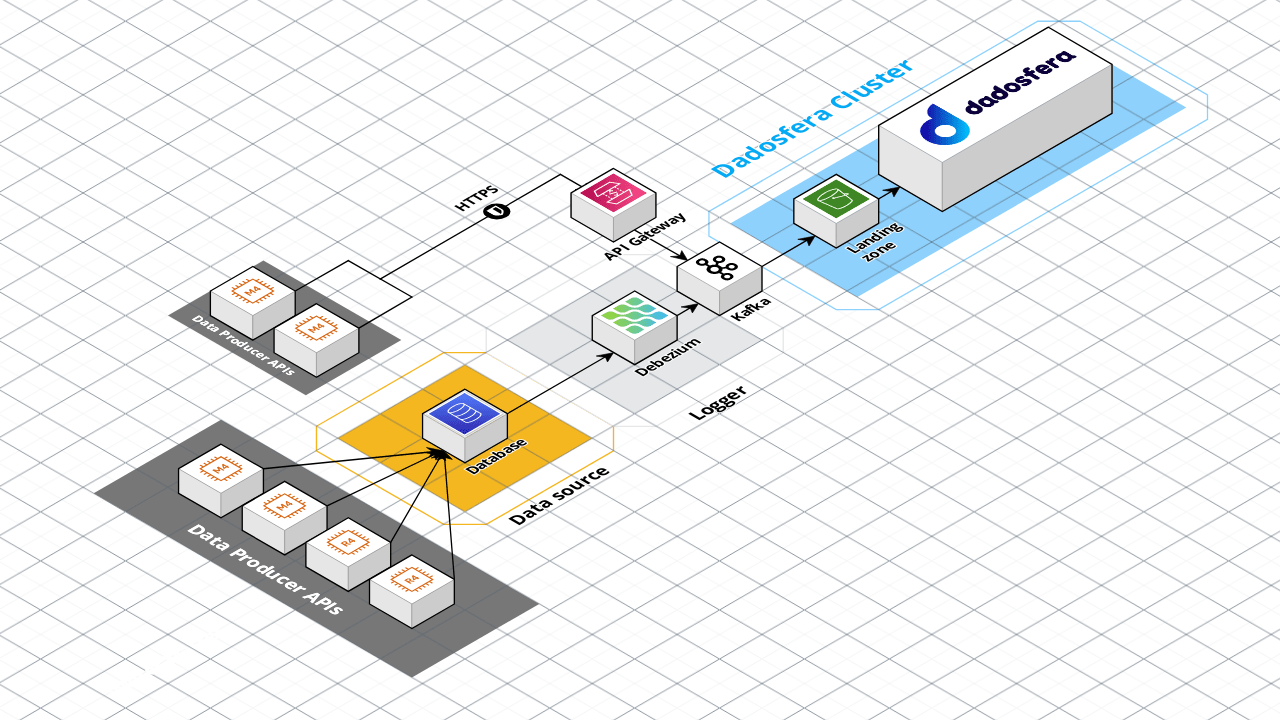
Authentication
Before interacting with the API, users must be authenticated. This ensures that only authorized personnel can upload JSON files to the system.
Signing In
To authenticate, follow these steps:
-
Request a Token:
- Endpoint:
/auth/signin - Method:
POST - Body:
{
  "email": "user@example.com",
  "password": "yourPassword"
}
- Endpoint:
-
Receive Authentication Token:
- Upon successful authentication, you will receive a token.
- Use this token in the header of your subsequent requests to the API.
Uploading JSON Files
Once authenticated, you can upload JSON files to the API, which will then process and store them in the designated AWS S3 bucket.
Uploading a File
-
Prepare Your Request:
- Endpoint:
/upload/json - Method:
POST - Headers:
Authorization: Bearer <your_token>
- Body:
- Attach the JSON file to be uploaded.
- Endpoint:
-
Send Your Request:
- Use your preferred HTTP client to send the request.
-
Processing and Confirmation:
- The API will validate and process the JSON file.
- Upon successful upload, a confirmation response will be sent.
Response Structure
Upon successful upload, you will receive a response in the following format:
{
  "status": "success",
  "message": "File uploaded successfully",
  "fileDetails": {
    "fileName": "<name_of_file>",
    "fileSize": "<size_of_file>",
    "s3Bucket": "<AWS_S3_bucket_name>"
  }
}
Error Handling
In case of errors, the API will return a response detailing the issue. Common error responses include:
401 Unauthorized: If the authentication token is missing or invalid.
400 Bad Request: If the request is improperly formatted.
500 Internal Server Error: For server-side issues.