Large Pipeline Example | Process
Before optimization
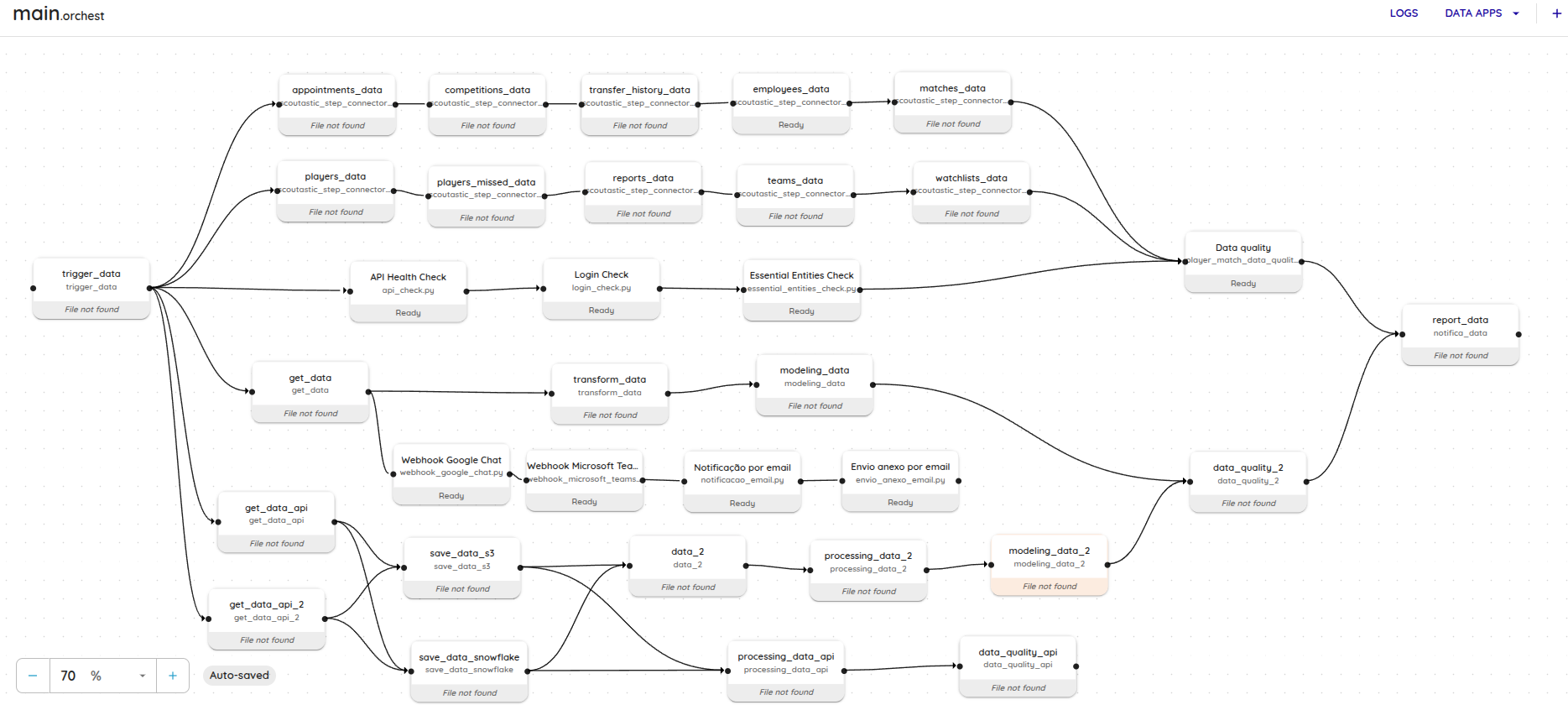
A pipeline was configured to perform every data processing stage in a single workflow, with these characteristics:
- Number of steps (tasks): 35 interdependent tasks, covering data ingestion through final validation.
- Environment variable usage: 8 variables storing important settings such as credentials, identifiers and temporary parameters.
- Identified problems: Configuration size and pipeline complexity prevented execution and exceeded the workflow orchestrator's technical limit, resulting in an execution error.
Applied solution
To solve the problem and prevent future failures, the following actions were implemented:
- Splitting the pipeline:
- The original pipeline was split into two smaller, independent pipelines:
- Pipeline 1: Focused on data ingestion, initial cleaning and generating temporary settings.
- Pipeline 2: Responsible for advanced processing and data validation.
- Intermediate data was shared between pipelines using a lightweight database (SQLite).
- The original pipeline was split into two smaller, independent pipelines:
- Reducing environment variable usage:
- Temporary variables were replaced with direct parameters between steps or stored in SQLite.
- Only essential, global variables were retained as environment variables.
After optimization
- Number of steps per pipeline:
- Pipeline 1: 15 steps.
- Pipeline 2: 20 steps.
- Environment variable usage:
- Reduced to 4 global variables; the rest are managed through the database or direct parameters.
- Result:
- Splitting significantly reduced generated instruction size, keeping it within the workflow orchestrator's technical limit.
- The pipelines ran successfully.
- Maintenance and monitoring became easier.
Lessons learned
- Limits on step count and complexity:
- Pipelines with more than 30 steps and considerable environment variable usage may reach the workflow orchestrator's technical limits.
- Splitting large pipelines is essential to avoid execution problems.
- Reducing and Managing Variables:
- Replacing temporary environment variables with lighter alternatives, such as direct parameters or databases, keeps pipelines efficient and within technical limits.
- Modularity for Scalability:
- Smaller, independent pipelines are easier to scale and monitor, and reduce the risk of errors caused by complexity.
Conclusion
Understanding technical limitations and adopting pipeline design best practices are essential for stable, efficient processes. Following this article's recommendations helps avoid instruction-size problems and create scalable, maintainable pipelines.
If you need help or have questions about implementing these practices, contact our support team.