Pipeline Management | Process
When developing and operating data processing pipelines, it is important to understand the technical limitations of the components that orchestrate these tasks. This article explains a common limitation related to generated pipeline instruction size and presents best practices to avoid execution problems while ensuring scalability and efficiency.
Technical limitation: pipeline instruction size
Components that manage and execute pipelines, such as orchestration systems, have technical limits on the size of the instruction set they can process. Factors influencing this limit include:
- Number of steps: More defined tasks produce larger instructions.
- Environment variable usage: Excessive or inappropriate usage can complicate pipeline settings and make efficient processing harder.
- Complex dependencies: Relationships between steps or settings can increase complexity.
Impact of the limitation
When instruction size exceeds the allowed limit, the pipeline may fail, remain in PENDING status or be automatically canceled by the system. This can cause delays and compromise delivery of results.
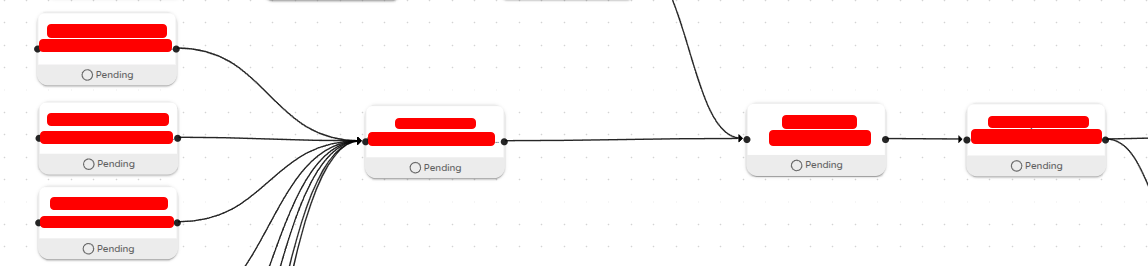
Pipeline management best practices
To avoid instruction-size problems, we recommend these practices:
- Splitting larger pipelines
- When to split:
- Pipelines with many steps or complex processes should be separated into smaller, modular components.
- How to do it:
- Identify independent steps that can be moved to another pipeline.
- Use databases or configuration files to share information between pipelines. Learn more here
- Benefits:
- Reduced complexity and instruction size.
- Easier monitoring and maintenance.
- Optimizing environment variable usage
- Simplify usage:
- Avoid storing large data volumes or complex settings in environment variables.
- Practical alternatives:
- Direct parameters between steps: Pass information generated by one step directly to the next as a parameter.
- Lightweight databases (SQLite): Store temporary settings or values shared between steps. Sharing information between pipelines
- External storage: For persistent or larger settings, use centralized databases or cloud storage services (for example, Snowflake or Amazon S3).
- Benefits:
- Reduces instruction set size.
- Makes configuration management easier.
- Monitoring settings and complexity
To avoid excessive pipeline complexity, we suggest:
- Regular Simplification: Periodically review pipeline settings for simplification opportunities, such as reducing steps or consolidating variables.
- Change Tracking: Before making significant changes, check whether increasing the number of steps or settings could affect pipeline execution.
If needed, our team can help configure automatic checks and alerts to monitor pipeline complexity and support preventive adjustments. Contact us to assess feasibility and implementation conditions.